Turn a photo of yourself into stickers
Upload one clear photo of a person and StickerStudio redraws them as cartoon stickers with captions such as LOL, Monday or Heart Eyes. Each sticker downloads as a PNG with a transparent background, ready for chats, stories or a sticker pack.

The photo
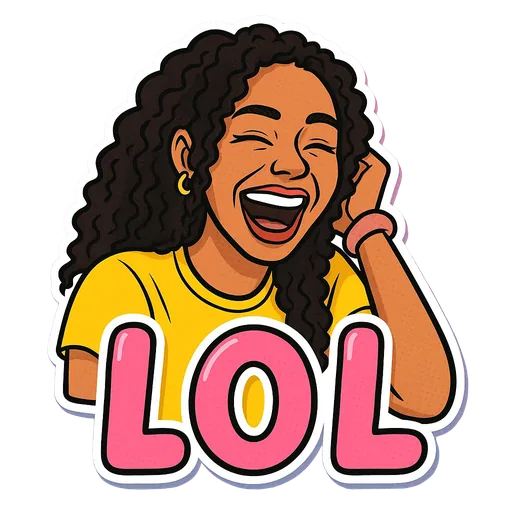
One sticker made from it
Step by step
- 1
Choose the photo
Pick a photo of one person with the face turned toward the camera, eyes visible and decent light. An ordinary phone selfie is enough.
- 2
Crop out everyone else
If other people are in the shot, crop it so only one face is left before uploading. The AI is built for a single person.
- 3
Upload it and pick expressions
Upload the photo (JPG, PNG or WebP, up to 10 MB), then choose which captioned expressions you want. You can pick up to 10 at a time.
- 4
Download from My Stickers
Stickers are made in the background, so you can leave the page. Finished ones appear in My Stickers, where you can download each PNG as often as you like.
What the AI changes and what it keeps
The sticker is a new drawing, not a cut-out of your photo. The AI is told to keep your face shape, skin tone, hair, facial hair, glasses and other distinctive features, and to change only the pose, expression and outfit to fit the caption. A Monday sticker might put you in pyjamas holding a coffee mug, for example.
Because it is a stylised cartoon, the likeness is close but not photographic. Now and then a detail such as a hairstyle or an earring comes out differently.
Tips for a better result
- Use a photo where your face fills a good part of the frame. In wide shots the face is tiny and the AI has less to work from.
- Turn off beauty filters and heavy colour effects. The AI copies what it sees, including smoothed skin or odd colours.
- Sunglasses, masks and hands over the face hide the features the AI needs to keep you recognisable.
- Use the same photo for a whole set so all your stickers look like the same version of you.
- If one result looks off, try a different photo rather than the same one again.
What StickerStudio won't do
- It draws people only. Pets, objects and scenery are not supported.
- One person per sticker. Group photos do not work well.
- Captions come from the built-in list. You cannot type your own text yet.
- It does not cut out your original photo. Every sticker is a cartoon redraw.
Other ways to do it
If you want the actual photo as a sticker, not a drawing, you do not need AI. On iPhone (iOS 17 or later) you can touch and hold the subject of a photo and choose Add Sticker, and recent versions of WhatsApp and Telegram can turn an image into a sticker inside the app. Free background removers do the same job. StickerStudio is for when you want an illustrated version of yourself pulling an expression you never photographed.
How StickerStudio makes the sticker
- 1
Upload one photo
A clear photo of one person, face visible. JPG, PNG or WebP, up to 10 MB. It is kept in your private library so you can make more stickers from it later.
- 2
Pick expressions
Choose from 60+ captioned expressions such as LOL, WTF, Monday, Heart Eyes and Send Help, up to 10 at a time.
- 3
The AI draws each sticker
An image model redraws the person as a cartoon in that pose, adds the caption and a white die-cut border, and removes the background. It runs in the background, so you can leave the page.
- 4
Download the PNG
Finished stickers appear in My Stickers as transparent PNGs with no watermark. Download them as often as you like.
Questions
Can I turn any photo into a sticker?
Any photo of one person whose face is clearly visible. Photos of pets, groups or objects are not supported.
Will the sticker look like me?
The AI is instructed to keep your face shape, skin tone, hair and features such as glasses or freckles. The result is a cartoon, so it is a likeness rather than a photo, and occasionally a detail is off.
What file do I get?
A square PNG with a transparent background and a white die-cut border around the drawing. There is no watermark.
Is it free?
Your first sticker is free when you sign up. After that you buy credit packs, starting at 3 stickers for $2.99.
Try it with your photo
Sign up, upload a photo and pick an expression. Your first sticker is free.
Last reviewed 2026-11-03. Questions or corrections: contact@stickerstudio.art.