Make a cartoon sticker of yourself
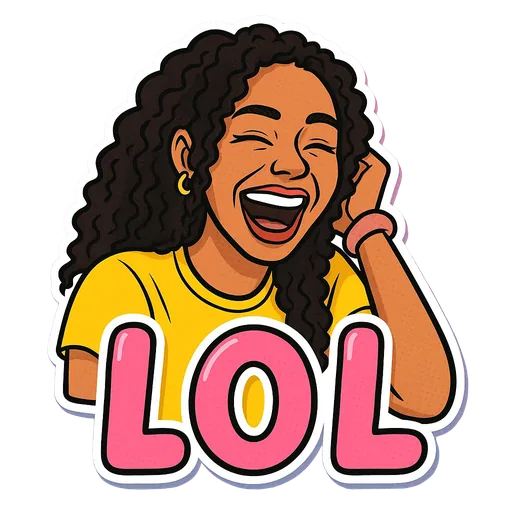
StickerStudio draws you in one consistent cartoon style: clean outlines, flat shading, bright colours and a big readable caption. You upload a photo, pick an expression, and get a die-cut sticker of yourself in that pose.

The photo
One sticker made from it
Step by step
- 1
Upload a clear photo of your face
Front-facing and well lit works best. The AI needs to see your eyes, nose, mouth and hairline to carry them into the drawing.
- 2
Pick the expression
Each option is a pose plus a caption, for example LOL (laughing), Mind Blown (hands at the temples) or Boss Energy (arms crossed).
- 3
Check the result
Open the sticker in My Stickers and compare it with your photo. If the likeness is not right, a different photo usually helps more than retrying the same one.
What the cartoon style looks like
- Bold, clean outlines with smooth, simple shading.
- Saturated, cheerful colours rather than realistic skin and lighting.
- Exaggerated expressions and poses so the emotion reads at chat size.
- A caption in large display lettering across the lower part of the sticker.
- A white border that follows your outline, like a die-cut vinyl sticker.
What stays and what changes
Kept from your photo: face shape, skin tone, hair colour and style, facial hair, glasses, freckles and similar features. The AI is also told not to change your age, weight or gender, and not to swap in a more generic face.
Changed to fit the caption: your pose, facial expression, outfit and sometimes small props, such as a coffee mug for Coffee First or a crown for Queen/King.
Tips for a better result
- Glasses carry over, so upload a photo with them on if you usually wear them.
- Hair is copied from the photo. If you have changed your hairstyle, use a recent photo.
- A neutral or slightly smiling photo gives the AI the most room to draw other expressions.
- Plain backgrounds are not required, since the background is removed anyway, but they help the AI see your outline.
What StickerStudio won't do
- There is one art style. Anime, watercolour, pixel art and 3D looks are not available.
- It is not a caricature. Features are not deliberately exaggerated for comedy.
- It cannot copy a specific cartoon or brand style.
- Results vary a little from sticker to sticker, as with any image model.
Other ways to do it
Avatar builders such as Bitmoji, Memoji or Samsung AR Emoji are free and let you assemble a cartoon of yourself feature by feature, but the result is built from presets rather than drawn from your photo. Commissioning an illustrator gets you a unique style and full control, at a much higher price. Photo-filter apps can give a quick cartoon effect, but they rarely change your pose or add a caption.
How StickerStudio makes the sticker
- 1
Upload one photo
A clear photo of one person, face visible. JPG, PNG or WebP, up to 10 MB. It is kept in your private library so you can make more stickers from it later.
- 2
Pick expressions
Choose from 60+ captioned expressions such as LOL, WTF, Monday, Heart Eyes and Send Help, up to 10 at a time.
- 3
The AI draws each sticker
An image model redraws the person as a cartoon in that pose, adds the caption and a white die-cut border, and removes the background. It runs in the background, so you can leave the page.
- 4
Download the PNG
Finished stickers appear in My Stickers as transparent PNGs with no watermark. Download them as often as you like.
Questions
Can I choose a different art style?
Not at the moment. Every sticker uses the same bold cartoon style so a set looks consistent.
Will it make me look different?
It should not. The AI is told to keep your features, age, weight and skin tone. If a sticker misses, email us at contact@stickerstudio.art and we will look at it.
Can I make a cartoon of my whole body?
Stickers are framed head-and-shoulders or upper body, which keeps the face readable at small sizes.
Try it with your photo
Sign up, upload a photo and pick an expression. Your first sticker is free.
Last reviewed 2026-11-03. Questions or corrections: contact@stickerstudio.art.