Make Telegram stickers from a photo of yourself
Telegram lets anyone publish a sticker set, and the @Stickers bot does it in a few messages. StickerStudio gives you the artwork: cartoon stickers of you with captions, already cut out on a transparent background.

The photo
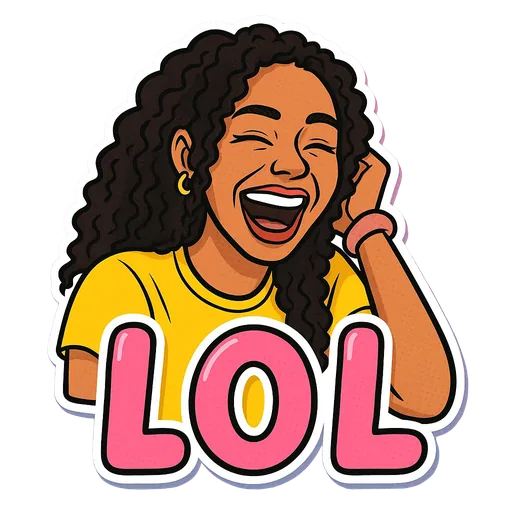
One sticker made from it
Step by step
- 1
Make and download your stickers
Create the stickers in StickerStudio and download the PNGs from My Stickers.
- 2
Resize to 512 pixels
Telegram wants one side to be exactly 512 px and the other 512 px or less. Your StickerStudio PNG is larger, so resize it to 512 × 512 in any image editor and keep it as PNG to preserve transparency.
- 3
Start a set with @Stickers
Open a chat with the official @Stickers bot, send /newpack and give the set a name.
- 4
Send each sticker as a file
Send the PNG as a file, not as a photo, so Telegram does not compress it. Reply with an emoji that matches the sticker, then repeat for the rest.
- 5
Publish
Send /publish, optionally upload a set icon, and choose a short name. That name becomes the link (t.me/addstickers/yourname) you can share with friends.
Telegram sticker requirements
- PNG or WebP with a transparent background.
- One side exactly 512 px, the other 512 px or less.
- Each file under 512 KB.
- Each sticker is linked to at least one emoji, which is how Telegram suggests it while you type.
The in-app option
Newer Telegram versions can also make a sticker from an image without the bot, from the sticker panel. That is quicker for one or two stickers. The bot is still the way to build and share a named set.
Tips for a better result
- Match emojis to captions, for example 😂 for LOL or ☕ for Coffee First, so Telegram suggests the right sticker as you type.
- Pick the short name (the link) carefully. You can rename the set later, but not change its link.
- You can keep adding stickers to the same set later with /addsticker.
What StickerStudio won't do
- StickerStudio does not publish to Telegram for you. You use the bot or the in-app editor.
- Telegram supports animated and video stickers, but StickerStudio only makes still images.
- You need to resize the files to 512 px yourself.
Other ways to do it
If you want a cut-out of a real photo, Telegram's own sticker editor and the @Stickers bot work fine with any image that has a transparent background, and free background removers can make one. StickerStudio is for cartoon versions of yourself with captions you can use as reactions.
How StickerStudio makes the sticker
- 1
Upload one photo
A clear photo of one person, face visible. JPG, PNG or WebP, up to 10 MB. It is kept in your private library so you can make more stickers from it later.
- 2
Pick expressions
Choose from 60+ captioned expressions such as LOL, WTF, Monday, Heart Eyes and Send Help, up to 10 at a time.
- 3
The AI draws each sticker
An image model redraws the person as a cartoon in that pose, adds the caption and a white die-cut border, and removes the background. It runs in the background, so you can leave the page.
- 4
Download the PNG
Finished stickers appear in My Stickers as transparent PNGs with no watermark. Download them as often as you like.
Questions
Why did the bot reject my image?
Usually the size: one side must be exactly 512 px. Also make sure you sent it as a file, not as a compressed photo.
Can other people add my sticker set?
Yes. Share the t.me/addstickers link, or send one of the stickers and others can add the set from it.
How many stickers should I make?
There is no minimum that matters in practice. Most personal sets start with 5 to 10 everyday reactions.
Try it with your photo
Sign up, upload a photo and pick an expression. Your first sticker is free.
Last reviewed 2026-11-03. Questions or corrections: contact@stickerstudio.art.