Make a sticker pack of yourself from one photo
A sticker pack is just a set of stickers that belong together. With StickerStudio you upload one photo, pick several expressions at once, and get a matching set of cartoon stickers of you, ready to load into WhatsApp, Telegram or iMessage.

The photo
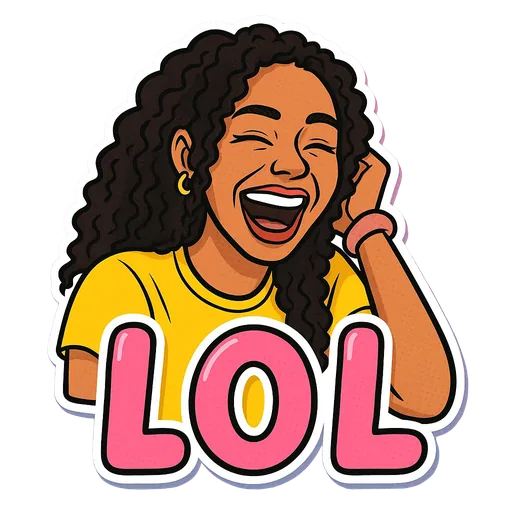
One sticker made from it
Step by step
- 1
Decide the size of the pack
WhatsApp packs need at least 3 stickers. Around 8 to 12 covers most everyday replies without padding.
- 2
Upload one good photo
Every sticker in the pack is drawn from the same photo, so choose a clear, well-lit one. It stays in your private library for later additions.
- 3
Select expressions in one batch
Choose up to 10 expressions at once. Each sticker uses 10 credits, and the app shows the total before you start.
- 4
Download and load the pack
Download the PNGs from My Stickers, then add them to your chat app with its own tools or a sticker-pack app.
What a pack costs
Your first sticker is free. After that, credit packs work out to 3 stickers for $2.99, 10 for $7.99 or 25 for $16.99. They are one-time purchases, not a subscription. A 10-sticker pack is the usual sweet spot for a personal set.
A balanced starter pack
- Two agreement stickers (Bet, Facts).
- One polite no (Respectfully No).
- Two laughs or reactions (LOL, WTF).
- Two moods (Monday, Coffee First).
- One affectionate one (Heart Eyes).
- Two hype stickers for friends (Let's Go, Slay).
Tips for a better result
- Add to the pack later from the same photo in your library so new stickers match the old ones.
- Keep all the PNGs in one album or folder. Sticker-pack apps import faster that way.
- If one sticker in the batch comes out weaker, leave it out of the pack rather than lowering the bar for the whole set.
What StickerStudio won't do
- A batch is limited to 10 expressions, so bigger packs take more than one batch.
- StickerStudio does not export a ready-made WhatsApp or Telegram pack file. You assemble it in the chat app or a sticker-pack app.
- No animated stickers.
Other ways to do it
Sticker-pack apps can build a pack from your existing photos for free by cutting out the background. Commissioned illustrated packs from an artist look great and cost far more. StickerStudio is the middle option: illustrated stickers of you, a few dollars per pack.
How StickerStudio makes the sticker
- 1
Upload one photo
A clear photo of one person, face visible. JPG, PNG or WebP, up to 10 MB. It is kept in your private library so you can make more stickers from it later.
- 2
Pick expressions
Choose from 60+ captioned expressions such as LOL, WTF, Monday, Heart Eyes and Send Help, up to 10 at a time.
- 3
The AI draws each sticker
An image model redraws the person as a cartoon in that pose, adds the caption and a white die-cut border, and removes the background. It runs in the background, so you can leave the page.
- 4
Download the PNG
Finished stickers appear in My Stickers as transparent PNGs with no watermark. Download them as often as you like.
Questions
Do all the stickers look like the same person?
They are all drawn from the same photo with the same instructions to keep your features, so they match closely, though small details can vary between stickers.
Can I make a pack for someone else?
Yes, with their permission. Use a photo of them and add the stickers to a pack you share.
Try it with your photo
Sign up, upload a photo and pick an expression. Your first sticker is free.
Last reviewed 2026-11-03. Questions or corrections: contact@stickerstudio.art.